The best mechanical keyboard depends on how much desk space you can spare, which switch feel you prefer and whether you need wireless connections or a number pad. These picks range from compact 75% layouts to feature-rich 96% boards, with clear differences in controls, lighting and switch customization.
Quick Top Products
SOLAKAKA KI99 Pro 96% Wireless Mechanical Keyboard
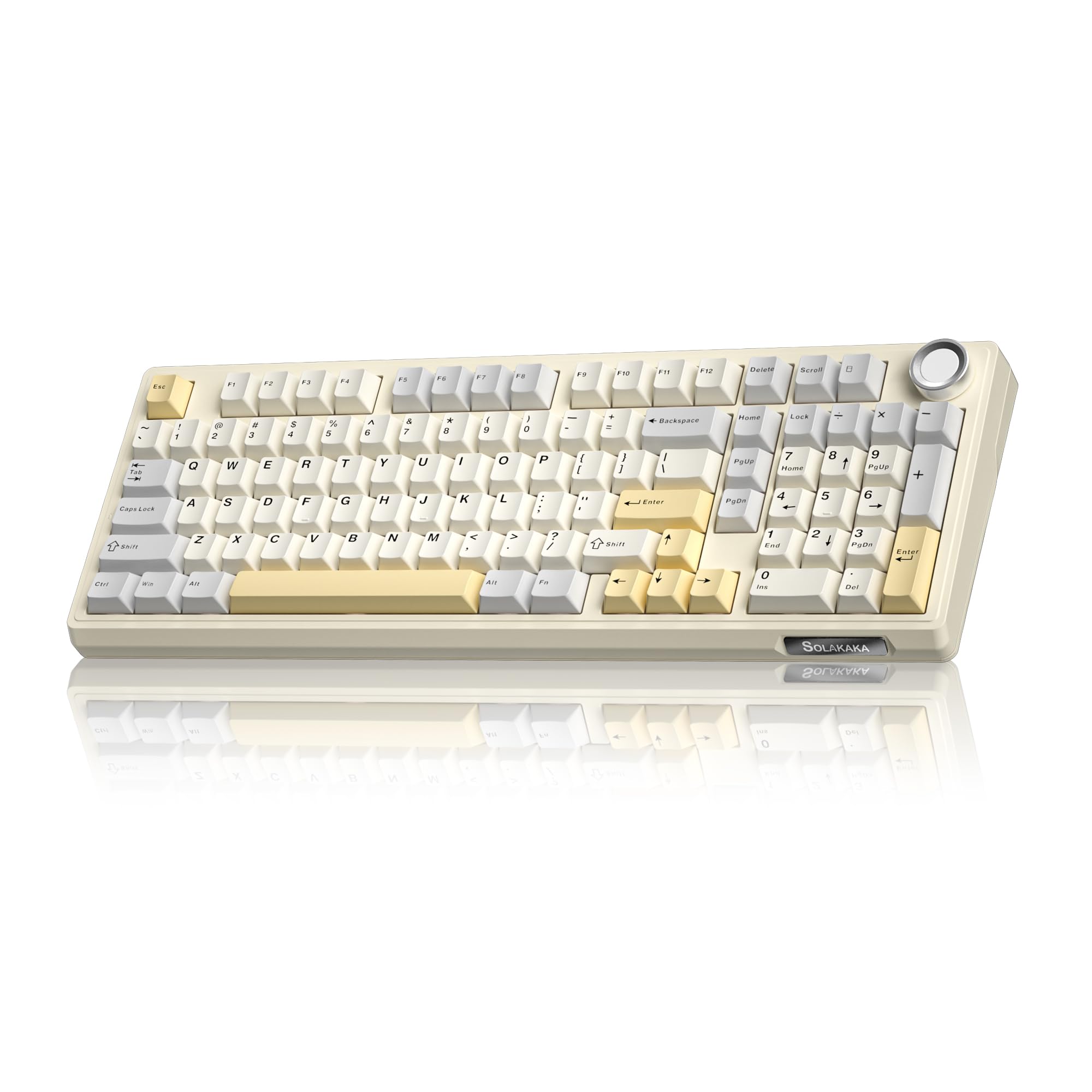
- 96% layout includes a number pad and multifunction knob.
- Bluetooth, 2.4GHz wireless and USB-C connections; 10,000mAh battery.
- Hot-swappable switches, PBT keycaps and programmable RGB lighting.
Best For: People who want a number pad, wireless flexibility and a large stated battery capacity.

SteelSeries Apex 7 TKL Mechanical Gaming Keyboard
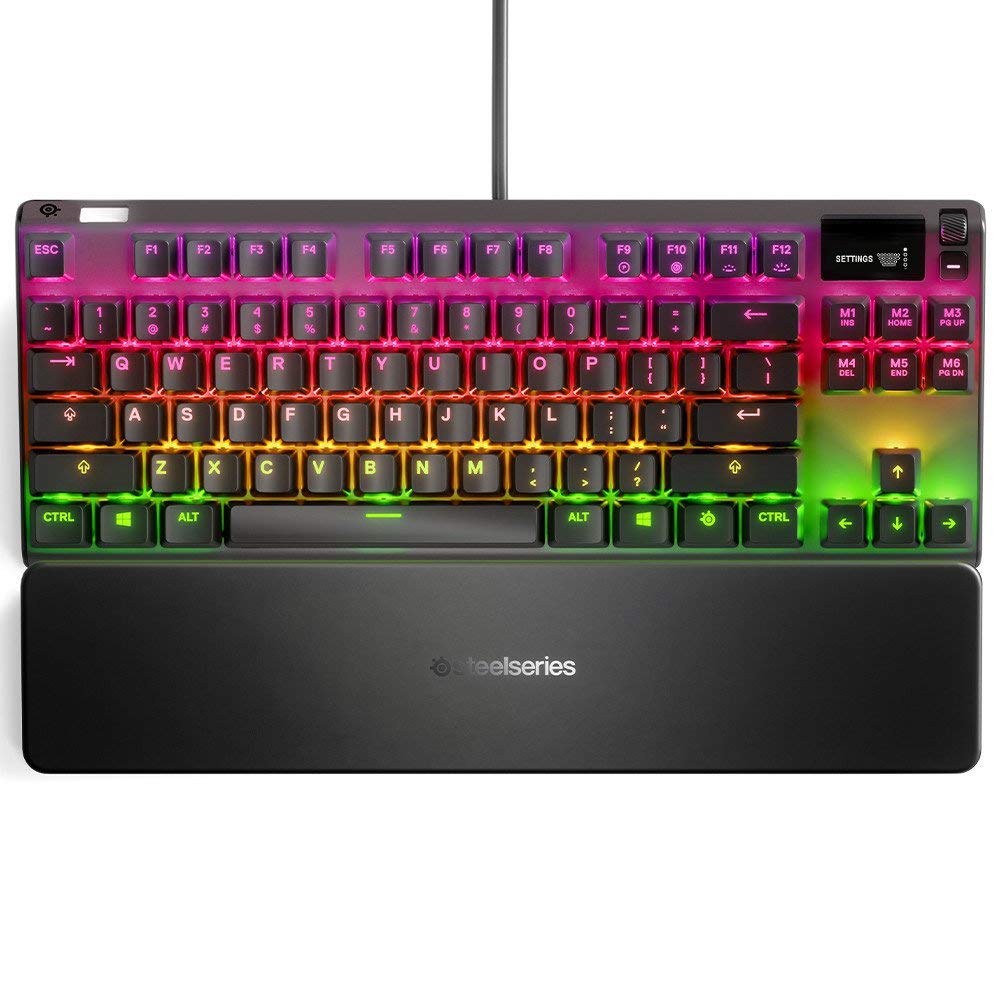
- Tenkeyless layout saves space while retaining function keys.
- Linear red switches, OLED smart display and media controls.
- Per-key RGB, USB passthrough, aluminum-alloy frame and magnetic wrist rest.
Best For: Gamers who want a compact tenkeyless board with an OLED display and linear red switches.
SteelSeries Apex Pro Mini
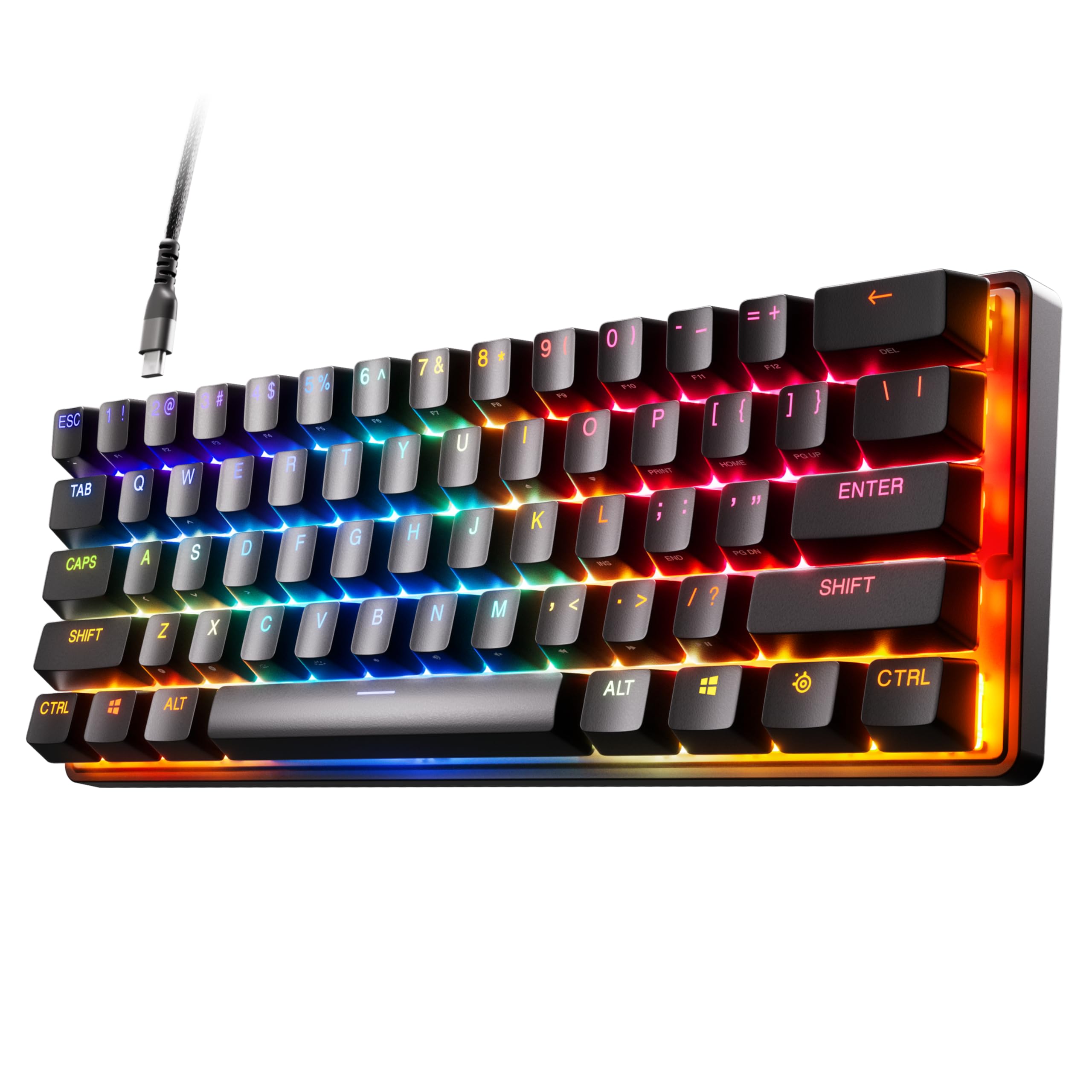
- 60% layout with adjustable actuation across 40 per-key levels.
- Rapid Trigger and two-action key programming.
- PBT keycaps, aluminum top plate, RGB and detachable USB-C.
Best For: Players who want a very compact wired keyboard with adjustable per-key actuation.
SteelSeries Apex 7 Mechanical Gaming Keyboard
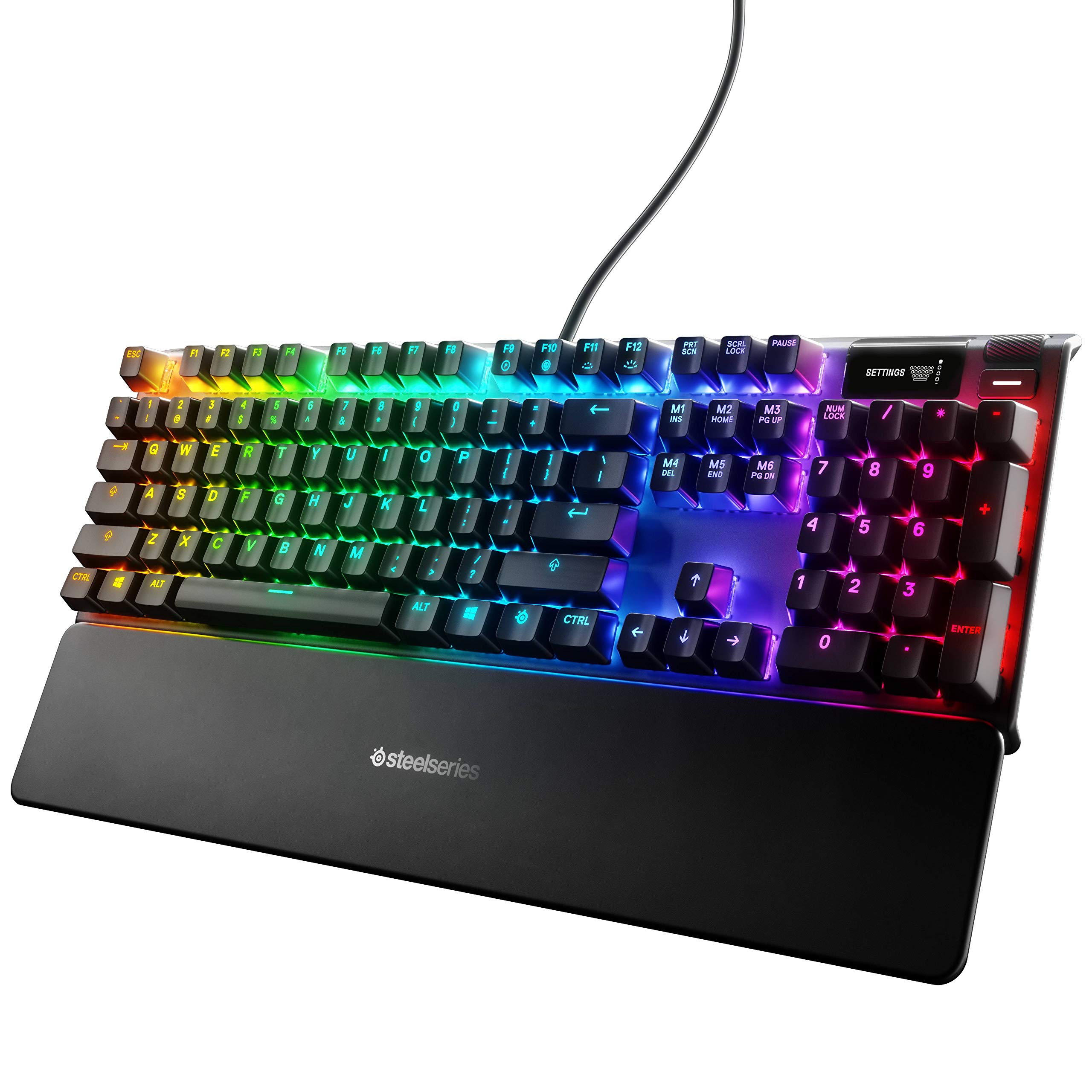
- Full-size layout with tactile, clicky blue switches.
- OLED display, media controls, USB passthrough and per-key RGB.
- Aluminum-alloy frame and included magnetic wrist rest.
Best For: Typists and gamers who want a full-size board with tactile, clicky blue switches and an OLED display.
SOLAKAKA A99 Pro Mechanical Keyboard
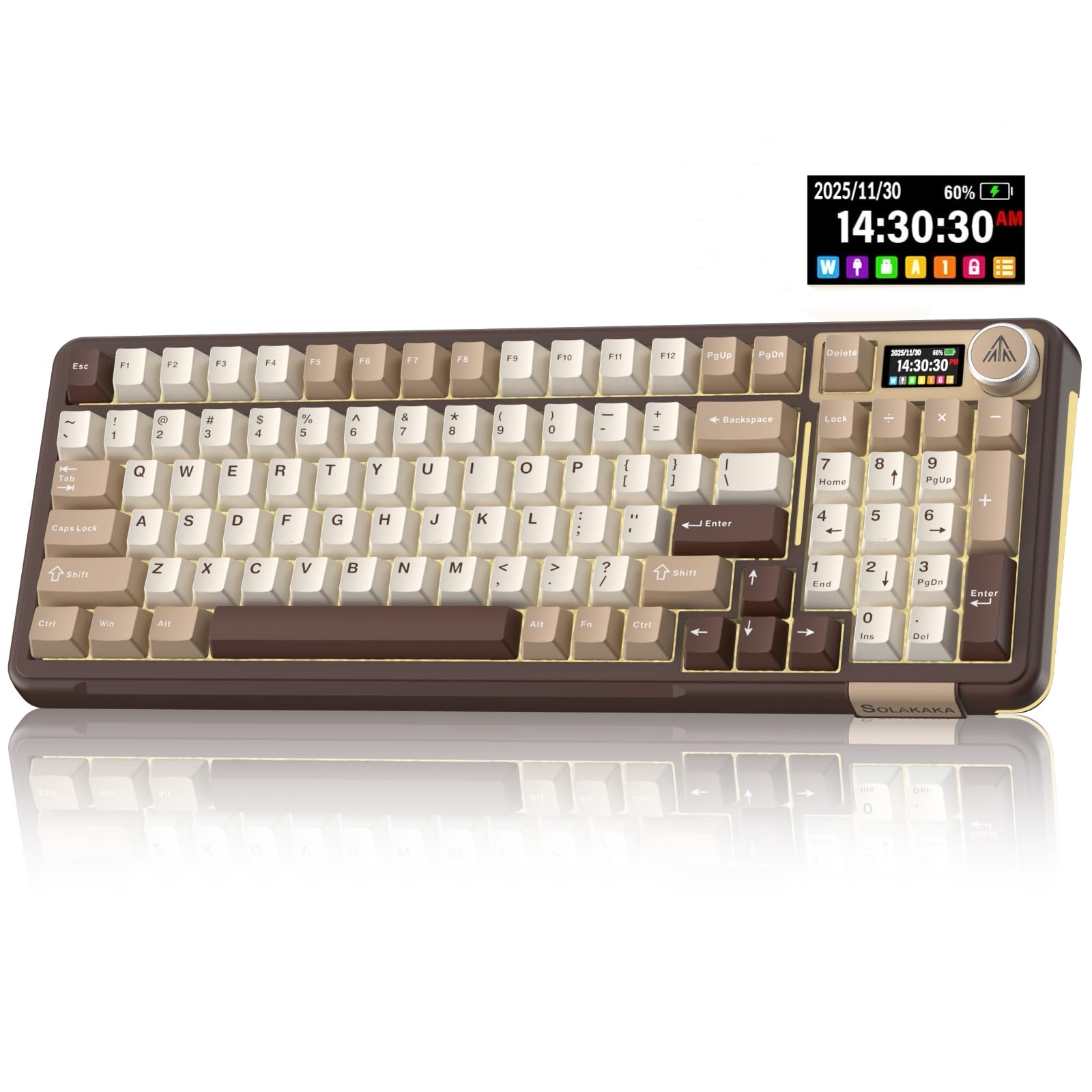
- 96% layout with LCD screen and multifunction metal knob.
- Bluetooth, 2.4GHz wireless and USB-C; supports up to five devices.
- Hot-swappable switches, gasket structure and RGB side lighting.
Best For: Users who want a wireless 96% keyboard with an LCD screen, knob and five-device switching.
SOLAKAKA A75 75% Wireless Gaming Keyboard
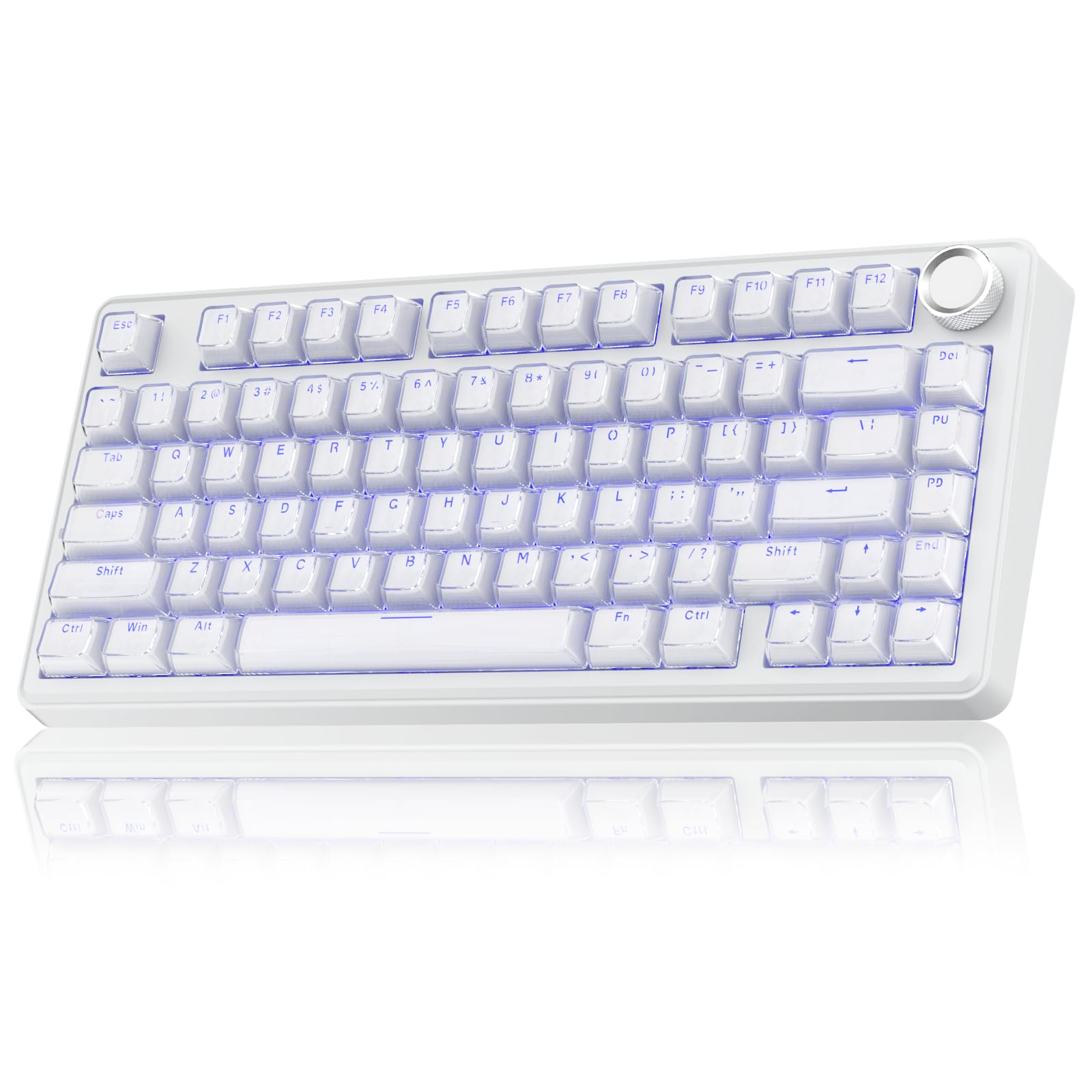
- 81-key 75% layout retains arrow keys in a compact footprint.
- Crystal-style keycaps, 17 RGB effects and multifunction knob.
- Tri-mode connection, five-device support and 4,000mAh battery.
Best For: People seeking a compact 75% layout, wireless connections and transparent crystal-style keycaps.
SOLAKAKA A75 75% Wireless Mechanical Keyboard
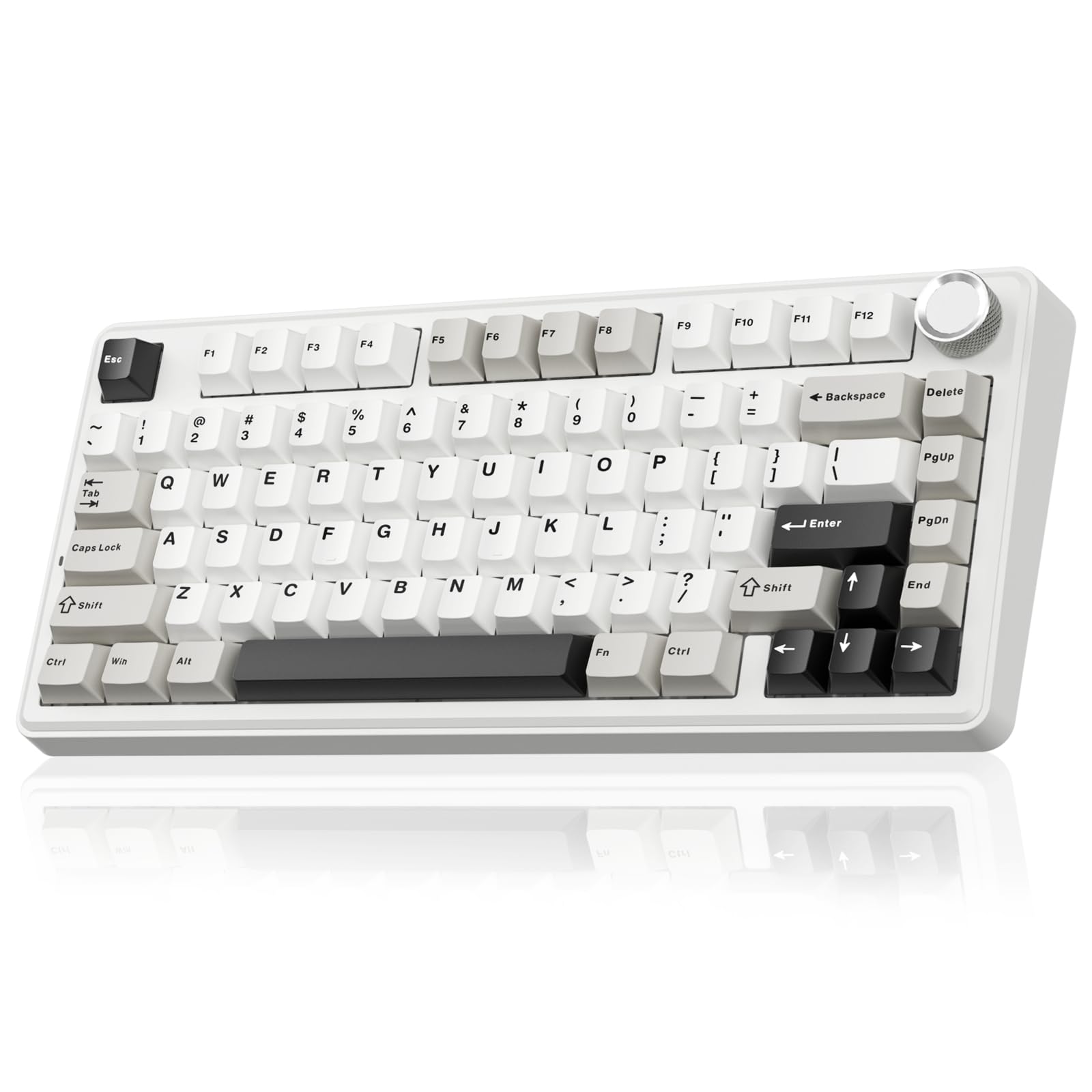
- 81-key 75% layout retains arrow keys in a compact board.
- PBT keycaps, 17 RGB lighting modes and multifunction knob.
- Bluetooth, 2.4GHz wireless and USB-C; 4,000mAh battery.
Best For: Buyers who want a compact wireless layout with PBT keycaps and a volume-and-lighting knob.
Long-Battery 96% Wireless
SOLAKAKA KI99 Pro 96% Wireless Gaming Keyboard, RGB Creamy Keyboardw with Knob, Hot-Swappable Pre-Lubed Switches, Gasket Structure Mechanical Keyboards (Beige-White, Non-Silent Version)
The KI99 Pro pairs a 96% layout with tri-mode connections, so it keeps most full-size functions, including a number pad, in a more compact footprint. It connects over Bluetooth 5.0, 2.4GHz wireless or USB-C, and its 10,000mAh battery reduces how often you need to recharge.
A multifunction knob handles volume, media and lighting brightness. The gasket structure and five noise-reducing layers shape its typing feel, while hot-swappable support accepts 3-pin and 5-pin switches without soldering.
PBT keycaps, RGB lighting and programmable software add customization. The non-silent version may not suit a quiet shared room.
Best For: People who want a number pad, wireless flexibility and a large stated battery capacity.
| Pros | Cons |
|---|---|
|
|
Choose this version if you want a near-full-size layout and the flexibility to switch between devices or connection types. Its number pad and knob suit desk work as well as gaming, while the hot-swap PCB gives you room to change the switch feel later.
The key tradeoff is sound: this is the non-silent version, so consider the quiet-switch KI99 Pro if reducing typing noise matters more than the specified color option.
Compact OLED and Media Controls
SteelSeries Apex 7 TKL Compact Mechanical Gaming Keyboard – OLED Smart Display – USB Passthrough and Media Controls – Linear and Quiet – RGB Backlit (Red Switch)
The Apex 7 TKL removes the number pad to save desk space while retaining a full row of function keys and the usual tenkeyless arrangement. This red-switch version is described as linear and quiet, a practical choice for users who prefer a smoother key press to a tactile click.
Its OLED smart display can show game, Spotify or Discord information and provide an on-keyboard command center. Per-key RGB offers extensive lighting options, and the keyboard includes USB passthrough and media controls.
The aluminum-alloy frame and magnetic wrist rest round out the setup. Wireless connectivity and hot-swap support are not specified, so check those needs before choosing it.
Best For: Gamers who want a compact tenkeyless board with an OLED display and linear red switches.
| Pros | Cons |
|---|---|
|
|
Pick the Apex 7 TKL if a smaller footprint matters and you value the OLED display, media controls and supplied wrist rest. Its linear red switches offer a different feel from the clicky blue options in the Apex 5 and Apex 7.
Since the number pad is omitted, it is less suitable for frequent numeric entry. Confirm that the stated red-switch configuration matches your preference.
Adjustable-Actuation 60% Board
SteelSeries Apex Pro Mini HyperMagnetic Gaming Keyboard – Adjustable Actuation – Compact 60% Form Factor – RGB – PBT Keycaps – USB-C
The Apex Pro Mini is the smallest layout here, using a 60% form factor while retaining full-size functionality through a compact arrangement. Its OmniPoint 2.0 HyperMagnetic switches provide 40 actuation levels per key, from 0.1 to 4.0mm, so you can set different activation depths for different keys.
Rapid Trigger adjusts activation and deactivation based on key travel, and two actions can be assigned to a key at different press depths. The keyboard has a premium aluminum top plate, PBT keycaps, RGB lighting and a detachable USB-C connection.
It works with Windows, Xbox, PlayStation and Mac, though not all software features are supported on Mac.
Best For: Players who want a very compact wired keyboard with adjustable per-key actuation.
| Pros | Cons |
|---|---|
|
|
Choose the Apex Pro Mini when compactness and configurable key actuation are priorities, particularly for a gaming setup where you want to tune key depths individually. Its 60% form factor asks you to rely on the keyboard’s compact layout for functions that larger boards present more directly.
It uses detachable USB-C; wireless operation is not specified. Mac users should check which software features are available on their system.
Clicky Full-Size Controls
SteelSeries Apex 7 Mechanical Gaming Keyboard – OLED Smart Display – USB Passthrough and Media Controls – Tactile and Clicky – RGB Backlit (Blue Switch)
This full-size Apex 7 combines tactile, clicky blue switches with an OLED smart display that can surface information from games, Spotify and Discord. The per-key RGB system supports extensive color customization, and the board includes USB passthrough and media controls for convenient access during play or desk work.
An aircraft-grade aluminum-alloy frame forms the base, and a magnetic wrist rest supplies palm support. The clicky switch feel is a defining fit consideration, particularly in shared rooms where audible key feedback may be distracting.
Wireless connectivity and switch hot-swap support are not specified, so verify those needs before purchase.
Best For: Typists and gamers who want a full-size board with tactile, clicky blue switches and an OLED display.
| Pros | Cons |
|---|---|
|
|
Consider this Apex 7 if you want a number pad, clicky tactile feedback and an on-board display without giving up media controls. The included wrist rest and per-key RGB are useful additions for a fixed desk setup.
Its clicky blue switches are a clear tradeoff compared with the smoother linear red option in the TKL Apex 7. Check that your workspace can accommodate a full-size board and its audible key feel.
96% Layout With LCD Screen
SOLAKAKA A99 Pro Mechanical Keyboard with LCD Screen & Metal Knob, Wireless Gaming Keyboard with BT5.0/2.4GHz/USB-C, Hot Swappable Creamy Keyboard, Gasket Structure, RGB Backlit, for Win/Mac
The A99 Pro combines a 96% layout with a small LCD screen and metal knob. The screen shows details such as time, battery level, connected system and connection mode, while the knob can change lighting, adjust volume or switch systems.
Tri-mode connections cover Bluetooth 5.0, 2.4GHz wireless and USB-C, with support for up to five devices. Its gasket structure uses five cushioning layers, and the switches are hot-swappable with 3-pin and 5-pin support.
RGB lighting includes side lights, and programmable software offers key mapping and macro features. The record for this version does not establish its battery capacity, so check that detail if wireless runtime is important.
Best For: Users who want a wireless 96% keyboard with an LCD screen, knob and five-device switching.
| Pros | Cons |
|---|---|
|
|
Choose the A99 Pro if you want a compact layout that retains a number pad and includes an LCD display for connection and battery details. Its knob handles several common adjustments, while tri-mode connectivity supports a multi-device desk.
The product facts do not give this version’s battery capacity, unlike the KI99 Pro, which has a stated 10,000mAh battery. Confirm the version’s key and switch details before purchase.
Crystal-Keycap 75% Layout
SOLAKAKA A75 Wireless Gaming Keyboard with Multifunction Knob, BT5.0/2.4GHz/USB-C, 75% Mechanical Keyboard, Hot-Swappable, Gasket Creamy Keyboard with RGB Backlit, Crystal Keycaps, for PC/Mac/PC
The SOLAKAKA A75 uses an 81-key, 75% layout that saves desk space while retaining arrow keys. Its transparent outer PC keycap shell gives the crystal-style caps a distinctive look, and the board provides 17 RGB lighting effects.
A multifunction knob changes volume or lighting and switches between gaming and office modes. Tri-mode connection supports Bluetooth 5.0, 2.4GHz wireless and USB-C, with up to five devices supported.
Hot-swap compatibility covers 3-pin and 5-pin switches, and the gasket structure includes several layers intended to soften the typing feel and sound. The battery capacity is 4,000mAh.
Check software support if you plan to customize settings on a system other than Windows.
Best For: People seeking a compact 75% layout, wireless connections and transparent crystal-style keycaps.
| Pros | Cons |
|---|---|
|
|
Pick this A75 if you want a compact board with a visually distinctive keycap style, an included knob and three connection modes. The 75% layout keeps arrow keys but has fewer dedicated keys than the 96% boards, and its 4,000mAh capacity is specified.
The supplied details do not establish a numeric-keypad layout. Confirm that the crystal-style keycaps and compact arrangement match your work and gaming habits.
PBT-Keycap 75% Wireless Value
SOLAKAKA A75 75% Wireless Mechanical Keyboard, Hot Swappable Gaming Keyboard with Multifunction Knob & RGB, Gasket Mounted Creamy Keyboard, PBT Keycaps, Compact Layout for Win/Mac/PC
This A75 keeps a familiar compact 75% layout with 81 keys and arrow keys, while its PBT keycaps are made with double injection molding. The board connects through Bluetooth 5.0, 2.4GHz wireless or USB-C and can support up to five devices.
A multifunction knob switches between gaming and office modes, selecting lighting effects or adjusting brightness in one mode and handling mute and volume in the other. It has 17 RGB lighting modes, hot-swappable 3-pin and 5-pin switches, and a 4,000mAh battery.
The Windows-only software requires wired mode, so plan to use shortcuts or another supported setup if you need software customization on a different system.
Best For: Buyers who want a compact wireless layout with PBT keycaps and a volume-and-lighting knob.
| Pros | Cons |
|---|---|
|
|
Choose this version if you want a compact wireless board with PBT keycaps and a practical knob, without the crystal-shell styling of another A75 option. Its 4,000mAh battery and tri-mode connections are specified, and the 81-key layout retains arrow keys.
The main consideration is software: its driver is Windows-only and operates in wired mode. Check whether keyboard shortcuts provide the customization you need on your system.
How to Choose Mechanical Keyboards
How We Picked Mechanical Keyboards
This selection focuses on complete mechanical keyboards with distinct layouts, switch types, connection options and controls. It includes compact 60% and 75% designs, tenkeyless boards and 96% layouts that retain a number pad.
Product-specific differences such as adjustable actuation, silent switches, hot-swap support, OLED or LCD displays, and multi-device wireless support help match each keyboard to a real desk setup.
The roundup keeps one representative offer for each model family where the supplied candidates repeat the same keyboard under different ASINs or variants. The selected products give buyers options for clicky or linear switch preferences, configurable actuation, compact layouts and near-full-size typing.
Comparing Mechanical Keyboards by Layout and Switch Feel
Layout shapes daily use. A 60% keyboard such as the Apex Pro Mini takes the least space, while the 75% A75 models retain arrow keys.
The Apex 7 TKL is a tenkeyless choice, and the KI99 Pro and A99 Pro 96% models preserve a number pad in a tighter footprint than a full-size board.
Switch feel differs just as much. The Apex 7 TKL uses linear red switches, while the full-size Apex 7 uses tactile, clicky blue switches.
The Apex 5 uses hybrid blue switches. The SOLAKAKA KI99 Pro selected here is the non-silent version; buyers prioritizing quieter typing should compare the silent-switch family and confirm its specific variant.
Hot-swap support appears on the SOLAKAKA models, which accept 3-pin and 5-pin switches, while the Apex Pro Mini stands out for per-key actuation adjustment.
| Product | Standout features | Best for |
|---|---|---|
| SOLAKAKA KI99 Pro 96% Wireless Mechanical KeyboardCheck Price |
| People who want a number pad, wireless flexibility and a large stated battery capacity. |
| SteelSeries Apex 7 TKL Mechanical Gaming KeyboardCheck Price |
| Gamers who want a compact tenkeyless board with an OLED display and linear red switches. |
| SteelSeries Apex Pro MiniCheck Price |
| Players who want a very compact wired keyboard with adjustable per-key actuation. |
| SteelSeries Apex 7 Mechanical Gaming KeyboardCheck Price |
| Typists and gamers who want a full-size board with tactile, clicky blue switches and an OLED display. |
| SOLAKAKA A99 Pro Mechanical KeyboardCheck Price |
| Users who want a wireless 96% keyboard with an LCD screen, knob and five-device switching. |
| SOLAKAKA A75 75% Wireless Gaming KeyboardCheck Price |
| People seeking a compact 75% layout, wireless connections and transparent crystal-style keycaps. |
| SOLAKAKA A75 75% Wireless Mechanical KeyboardCheck Price |
| Buyers who want a compact wireless layout with PBT keycaps and a volume-and-lighting knob. |
Choosing a Wireless Mechanical Keyboard for Your Desk
For a multi-device setup, the SOLAKAKA A75, A99 Pro and KI99 Pro support Bluetooth, 2.4GHz wireless and USB-C wired connections. The A75 and A99 Pro support up to five devices, while the KI99 Pro's stated battery capacity is 10,000mAh.
The A75 options specify 4,000mAh. Consider the battery detail alongside your layout needs rather than assuming all wireless boards have the same runtime.
SteelSeries options in this selection emphasize wired gaming controls and displays. The Apex 7 models include OLED screens, with media controls and USB passthrough noted for the TKL and full-size versions.
Check whether wireless use, device switching or an on-board display will make a meaningful difference at your workstation.
Features to Check Before Buying a Gaming Keyboard
Check the exact switch version before ordering. Clicky switches suit buyers who enjoy audible tactile feedback, while the red-switch TKL option is described as linear and quiet.
The KI99 Pro candidate is the non-silent version; choose a quieter switch type if sound matters in a shared space. A knob can make volume and lighting adjustments easier, but its controls vary by model.
Customization also differs. The Apex Pro Mini offers per-key actuation settings and Rapid Trigger, while SOLAKAKA's hot-swappable boards allow switch replacement without soldering.
Software availability can be system-specific: the A75 PBT version's driver supports Windows and requires wired mode. Check this point if you use Mac, and consider whether built-in shortcuts cover the settings you want.
Who Should Buy Which Mechanical Keyboard?
Choose the Apex Pro Mini for a very compact layout and adjustable actuation, or the Apex 7 TKL if you want an OLED display, red linear switches and a smaller footprint than a full-size board. The clicky, full-size Apex 7 suits buyers who want a number pad and dedicated screen and media controls.
Choose a SOLAKAKA 96% board if you want a number pad, wireless connections and hot-swap customization. The KI99 Pro offers a specified 10,000mAh battery and no LCD screen in its listed feature set; the A99 Pro adds an LCD and knob, with battery capacity not specified here.
For a compact 75% board, choose between crystal-style keycaps and PBT keycaps, then check the A75's driver compatibility against your operating system.